
Creating hex-number-themed background image from Part 1 did its job well. It set the tone for the site — data-forward, technical, alive. It also opened the door for another visual element.
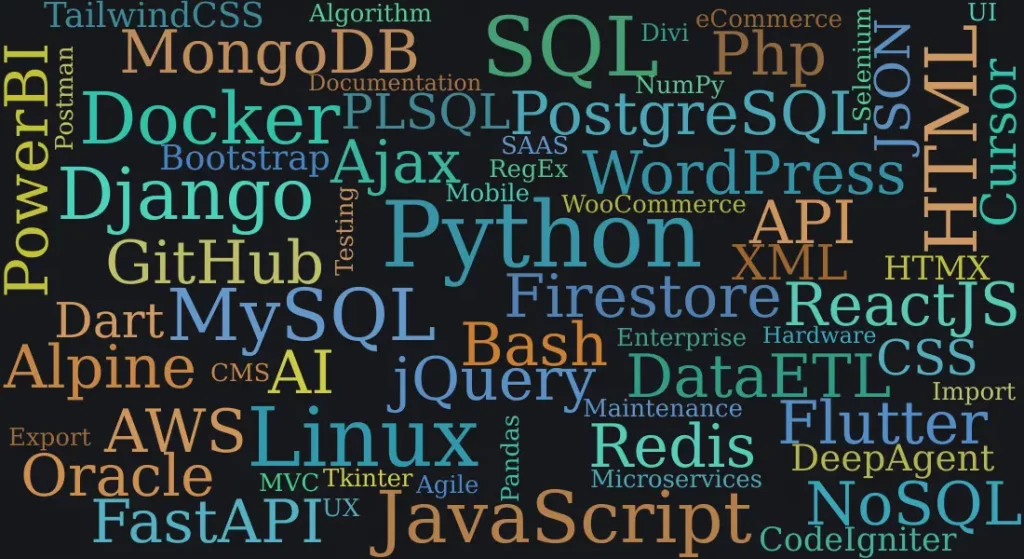
This web site acts in part as my resume and as such should showcase my skills and experience. The question is how to do it in a way that will hint that it’s not just a list of selected words? It has to stand out but cannot take away much attention from the rest of the content.
Challenges of Presenting Experience
Formal education may be a good starting point, and professional certificates are important indicators of effort and intention. Real expertise is accumulated over years of solving problems, making decisions under pressure, and occasionally learning things the hard way.
Previously I already created a large loading animation (see part 4) as the center of attention so this element had to be more subtle and contained. After some brainstorming word cloud came to my attention.
A word cloud is a snapshot. It’s visual, immediate, and proportional — bigger words mean more emphasis. It felt like the right format for conveying breadth of experience without turning the homepage into a list. Word cloud can be also quite flexible in regard to size, shape, colors, size and position of listed words.
Finding the Right Tool
A quick search confirmed that Python had an actively maintained library with clear documentation and enough examples to get something working in under one hour. Again, simplicity. The right tool is often the most obvious one.
The code itself is compact. Excluding comments, runs to around twenty lines. But the lines of code are rarely where the time goes.
Where the Real Work Happened
Two tasks consumed far more time than the coding itself — and neither involved a keyboard shortcut.
First: choosing the words. Too many words and it becomes visual noise. Too few and it looks sparse, incoherent, and unconvincing. The final selection aimed to balance core technologies (Python, SQL, Django, Linux, JavaScript, HTML, Docker), broader concepts (API, Data ETL, SAAS, Microservices, Deployment, Maintenance), and tools and libraries that reflect real day-to-day work (DBeaver, Postman, Pandas, GitHub, WordPress, WooCommerce). Each word was a deliberate choice. Frequency in the input string controls display size.
Second: choosing the colors. The word cloud needed to match the site’s background, but also to add more accent tones in order to highlight visual element identity and uniqueness. The word cloud library offers a range of built-in color maps, and a useful illustrated reference for exploring them is available from Kristen Davis at https://kristendavis27.medium.com/wordcloud-style-guide-2f348a03a7f8. None of the presets color themes looked exactly how I imagined it shoud be, so I coded a custom color function selecting semi-random HSL values from a curated set of hue targets, with controlled saturation and lightness ranges.
A Smarter Export Decision
Once the image looked right, the question became: how to optimize the size?
After browsing the documentation I found that the word cloud library supports SVG export — and that turned out to be a significant detail. SVG is a vector format stored as plain text, which means it scales perfectly at any screen size and remains fully editable after the fact. For this particular canvas — 1100×600 pixels, 65 words — the SVG file weighed in at 6.7kB. The equivalent WebP image was 88.1kB. That’s a 92% reduction in file size, which is not a rounding error when it comes to page load performance. Using SVG format also allows me reasonably easy and fast manual fine-tuning of each word’s position, size, color, and more. If your project requires pixel-perfect image this is an awesome detail!
There’s a lot more to say about SVG as a web design tool — enough for its own dedicated post. For now, the short version is: if your library offers SVG export, it’s usually worth taking.
Oddly enough, even though SVG is one of my favorite formats I forgot to include it into my word cloud.
import random
from wordcloud import WordCloud, STOPWORDS
import matplotlib.pyplot as plt

text = "HTML CSS JavaScript React Angular Vue Node.js API Database SQL NoSQL Frontend Backend Responsive Bootstrap Flexbox Grid SEO Accessibility Performance Hosting Domain SSL HTTP HTTPS Framework Library DOM JSON XML AJAX REST GraphQL Docker Kubernetes CI/CD Version Control Git Responsive Design UI UX Pixel Perfect Cross-browser Mobile-first PWA Microservices Serverless Cloud AWS Azure GCP Firewall Cache"

# hue values to select from
h_vals  = [30, 60, 150, 170, 190, 210]

# semi-random hsl colors
def my_clrs(word, font_size, position, orientation, random_state=None, **kwargs):
    h = h_vals[random.randint(0, len(h_vals) - 1)]
    s = random.randint(40, 60)
    l = random.randint(40, 60)
    return f"hsl({h}, {s}%, {l}%)"

def main():

    SHOW_IMG = False
    SAVE_FILE = True

    wc = WordCloud(background_color="#17181c",
                   collocations=False,
                   mode="RGBA",
                   width=1100,
                   height=600,
                   max_words=50,
                   random_state=17,
                   font_path='DejaVuSerif',
                   max_font_size=98,
                   min_font_size=24,
                   ).generate(text)

    plt.imshow(wc.recolor(color_func=my_clrs, random_state=1), interpolation="bilinear")
    plt.axis('off')

    # show and/or save image
    if SHOW_IMG:
        image = wc.to_image()
        image.show()

    if SAVE_FILE:
        image = wc.to_svg()
        with open("wordcloud-01.svg", 'w') as file:
            file.write(image)

if __name__ == "__main__":
    main()
Try It Yourself
Word clouds aren’t just for professional profiles. Create one from a list of things that motivate you, goals you’re working toward, or values that matter to you — then set it as your desktop wallpaper. It’s a surprisingly effective daily reminder, and it takes less than an evening to build.